

Migrating to one-click updating
If your pentestpad-docker directory has no init.sh, manage.sh, or update.sh in the repo root, you are on the
legacy layout. Follow the steps below once — after that, every future update is a single command or a single click.
Your database, uploaded reports, TLS certificates, and existing .env values are preserved throughout.
Migration steps
Section titled “Migration steps”Following migration guide should take no longer than 10 minutes.
1. Back up your current pentestpad-docker directory
Section titled “1. Back up your current pentestpad-docker directory”This creates a copy of your current setup, including any changes you may have made.
cp -r pentestpad-docker pentestpad-docker-backup2. Pull the new layout
Section titled “2. Pull the new layout”Navigate to your pentestpad-docker folder and do git pull
cd pentestpad-dockergit fetch origingit checkout maingit pullThis step may fail if you have changed any tracked files, such as docker-compose.yml or certificates:
ubuntu@ip-10-10-10-12:~/pentestpad-docker$ git pull origin main From https://github.com/PentestPad/pentestpad-docker * branch main -> FETCH_HEAD Updating 6fb4541..1c835ac error: Your local changes to the following files would be overwritten by merge: docker-compose.yml Please commit your changes or stash them before you merge. AbortingIf you get this error or with any other files you have edited, run the following. Keep in mind this discards your local changes, so make sure you made the backup in Step 1:
git reset --hard HEADgit pull origin main
# If you also have untracked files (new files not in git) you want gone:git clean -fd
Once the state is clean, run the pull again:
git fetch origingit checkout maingit pull3. Run ./init.sh
Section titled “3. Run ./init.sh”./init.shThis is the only time you ever need to run ./init.sh. It detects your existing install, keeps every value you
already had in .env, and adds the few new ones the current layout needs. Any missing *.dist config templates
are also copied into place.
4. Re-apply any custom changes
Section titled “4. Re-apply any custom changes”You now have a clean configuration that keeps future updates simple. The tracked files (docker-compose.yml, the
scripts) belong to the repo — never edit them directly, or the next git pull will conflict again.
Instead, put your customisations in the untracked, client-owned files. These are generated from .dist templates
by init.sh and are never touched by updates:
| File | What it’s for |
|---|---|
docker-compose.override.yml |
Any change you’d otherwise make to docker-compose.yml — ports, volumes, resource limits, extra services |
.env |
Application settings: APP_URL, database and mail credentials, license key |
docker/nginx/nginx.conf, docker/nginx/proxy.conf |
Web server and proxy configuration |
docker/nginx/certs/ |
Your TLS certificates |
docker/php/php.ini, docker/php/php-fpm.conf |
PHP settings — upload size, memory limits, workers |
If you had custom settings in your old layout (compare against the backup from step 1), move them into the matching file above.
5. Run the update script
Section titled “5. Run the update script”./manage.sh updateThis pulls the latest images, rolls them out with zero downtime, and finishes any one-time data migrations your old install needs. From here on, this is the single command you run to update.
6. Start the stack (if it isn’t already running)
Section titled “6. Start the stack (if it isn’t already running)”./manage.sh startFrom now on, how to update
Section titled “From now on, how to update”Pick either path — both run the same rollout:
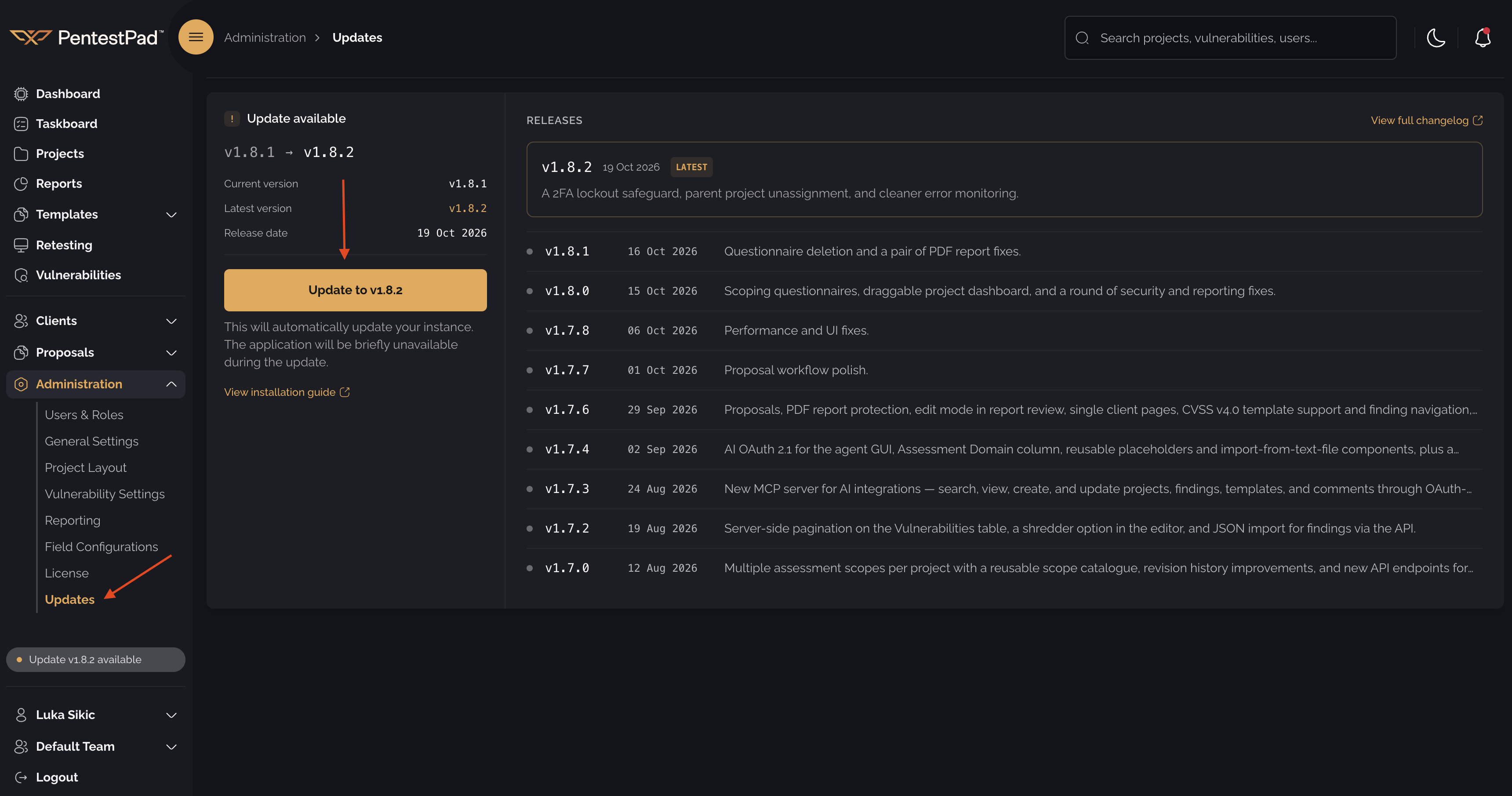
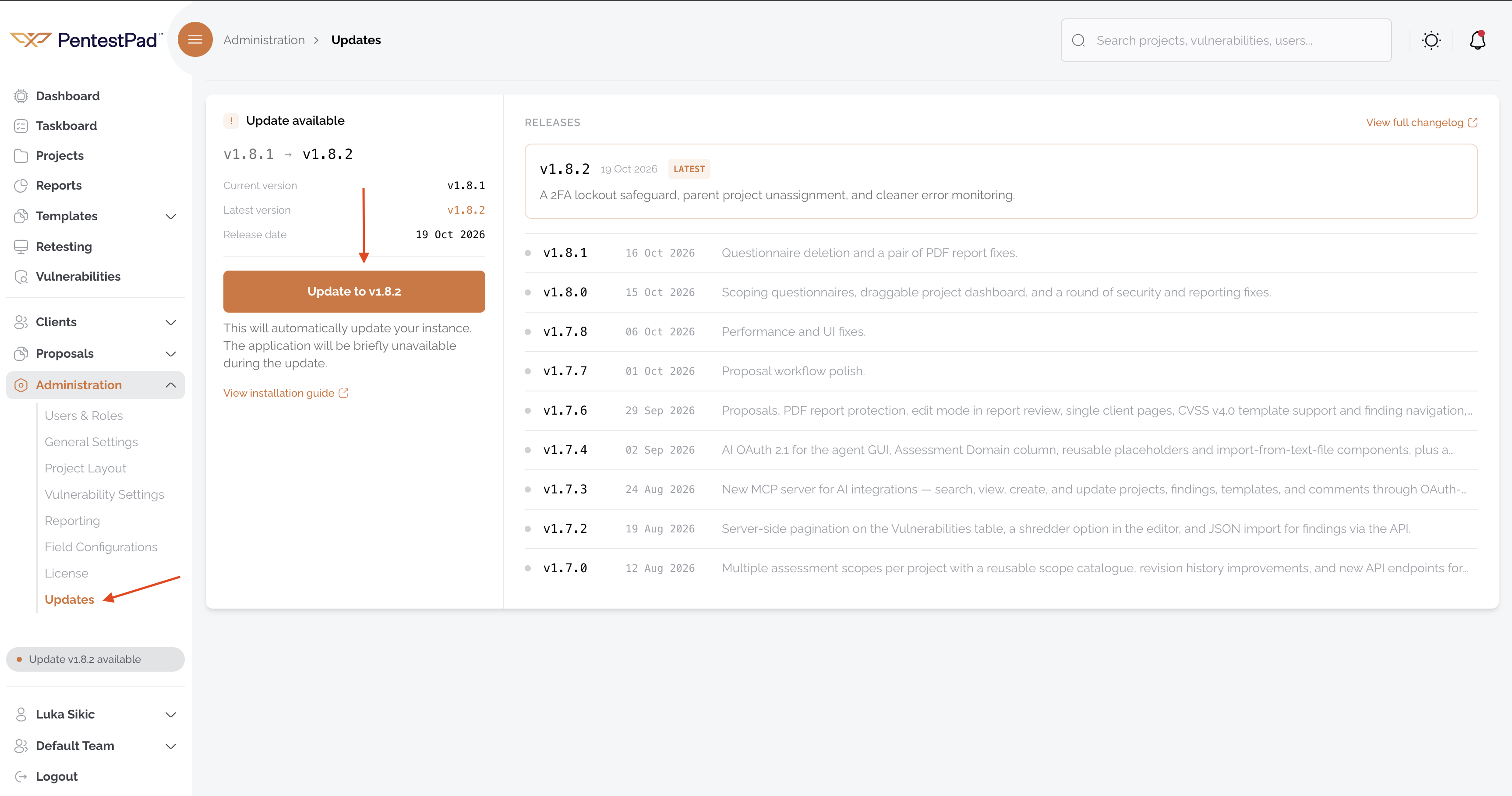
Sign in as an admin and open Administration → Updates. Click Update to latest version. The page shows live progress and the final version when the rollout finishes. No SSH, no shell.
cd /path/to/pentestpad-docker./manage.sh updateZero-downtime rollout. Safe to re-run if interrupted.
Everyday commands
Section titled “Everyday commands”| What you want | Command |
|---|---|
| Start the stack | ./manage.sh start |
| Stop the stack | ./manage.sh stop |
| Restart | ./manage.sh restart |
| See service status | ./manage.sh status |
| Tail logs | ./manage.sh logs (optionally pass a service name) |
| Shell into the app | ./manage.sh shell |
| Update to latest | ./manage.sh update |
| See deployed version | ./manage.sh version |
| Health check / validate install | ./manage.sh doctor |
| Rich state summary | ./manage.sh info |
Troubleshooting
Section titled “Troubleshooting”./manage.sh update says no basic auth credentials
Log in to the private registry on the host:
docker login repository.pentestpad.comAdmin UI “Update to latest version” doesn’t do anything
./manage.sh status should show update-watcher as Up. If it isn’t, run ./manage.sh start to bring it up,
then retry.
./manage.sh doctor reports a failure
Each FAIL line in the output tells you exactly what’s wrong — a stale docker login, a missing env variable, an
expiring TLS cert, etc. Fix the one it names and re-run.